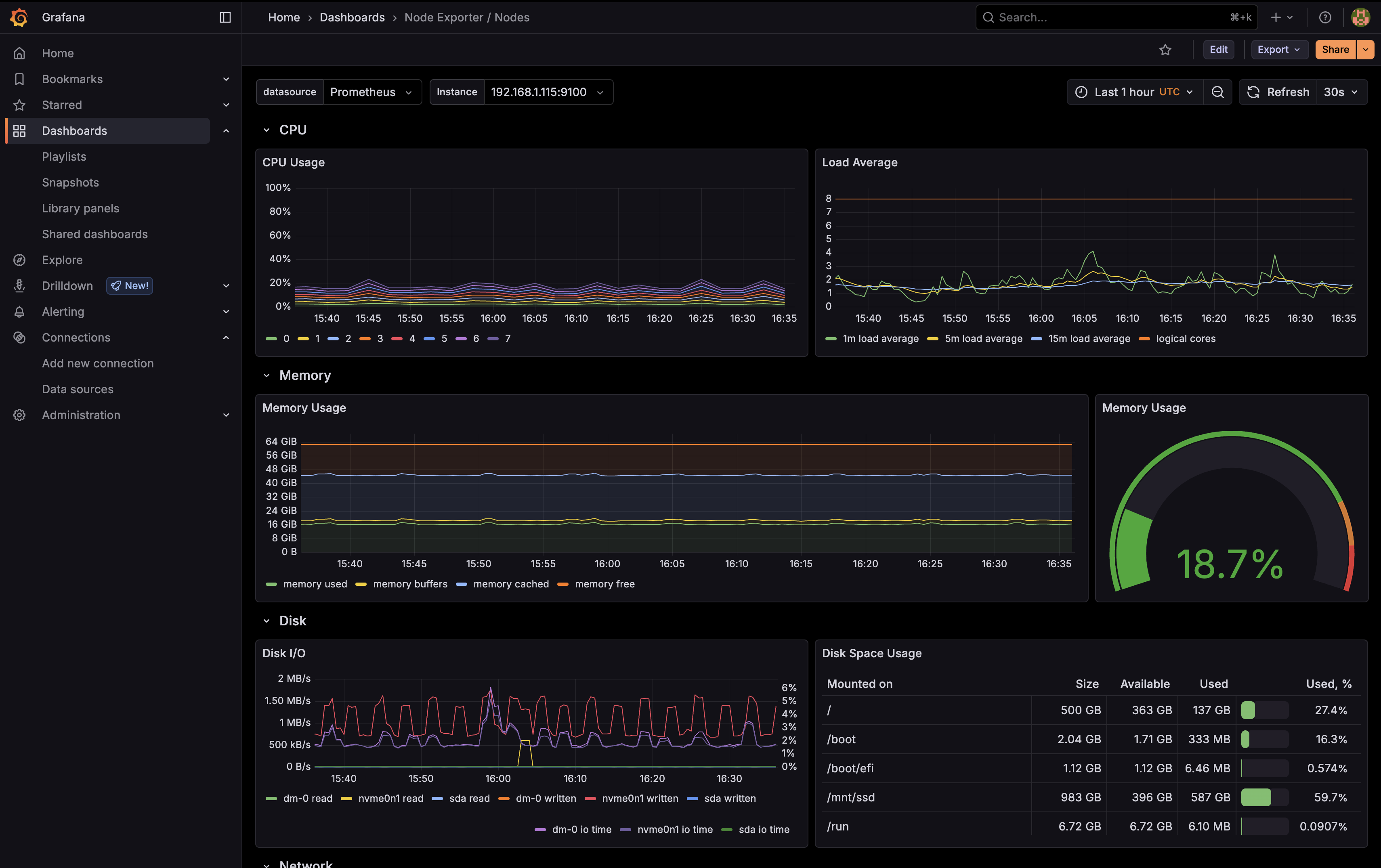
For systems and MLOps platform engineers, a home laboratory is the ultimate sandbox. It is an environment where you can test architectural configurations, deploy heavy enterprise databases, experiment with code coverage engines, and test cloud-native telemetry setups without worrying about cloud cost meters or production downtimes.
Instead of running massive, heat-generating server racks, I built my home cluster around a compact, high-efficiency system and customized **Microk8s** to drive a completely declarative GitOps configuration. Here is the operational blueprint of my setup.
Host System Hardware Specs
Since a homelab runs 24/7/365, power efficiency and noise are primary design constraints. I chose a refurbished **Dell Optiplex 3070** as the primary host system. It packs excellent single-core and multi-core power within a small form factor:
dns Optiplex 3070 Host Profile
- CPU: Intel Core i7-9700 (8 Cores, 8 Threads, up to 4.70 GHz). Perfect for handling concurrency and hosting automated build jobs.
- Memory: 16GB DDR4 RAM. Fully optimized through custom telemetry trims.
- Storage: 1.5TB SSD storage. Separated dynamically using specialized storage classes.
- Form Factor: Small Form Factor (SFF). Extremely quiet and fits perfectly in a small shelf.
Orchestration with Microk8s
I opted for **Microk8s** as the cluster orchestrator due to its lightweight profile and convenient, native packaging of core services. Rather than installing heavy manifest scripts, I leveraged a series of core and community addons to quickly structure the foundation of my cluster.
The following Microk8s addons are actively enabled in my environment:
Core Addons
- dns: CoreDNS for cluster service discovery.
- cert-manager: Automates SSL certificate handling.
- ingress: HTTP proxying for cluster-wide routing.
- ha-cluster: Configures single-node high-availability.
- metrics-server: Core service metrics for API access.
- helm & helm3: Helm chart installation capabilities.
- hostpath-storage: Standard hostpath directory storage.
Community Addons
- argocd: Drives declarative continuous delivery.
- openebs: Robust storage orchestration on bare-metal.
- observability: Slashes cluster metrics logging overhead.
- community: Connects community addon repositories.
Memory Optimization: Trimming Observability
Running a fully-loaded Prometheus and Grafana stack can easily consume 6GB+ of RAM on a host node—which is a huge tax in a 16GB RAM constraint.
To address this, I customized the Microk8s observability addon. By enforcing a modern, highly-optimized version of the Prometheus Operator stack, I slashed the telemetry footprint:
microk8s enable observability --kube-prometheus-stack-version=72.7.0The Result: Telemetry memory usage dropped by **more than half**, freeing up valuable system memory to host actual application payloads!
Workarounds & Custom Helm Deployments
In complex setups, you often hit real-world issues where GitOps engines like ArgoCD struggle to deploy specific, deep-nested Helm templates natively. For instance, my **MLflow** stack requires targeted initial configuration parameters.
To work around ArgoCD sync failures for MLflow, I decoupled its lifecycle and installed it directly via Helm OCI registries, patching the network configuration on-the-fly to operate without a cloud load balancer:
# Install MLflow with custom PostgreSQL authentication
helm install mlflow oci://registry-1.docker.io/bitnamicharts/mlflow \
  --set postgresql.auth.password=<password> \
  --set postgresql.auth.username=jerry \
  --set tracking.auth.password=<password>

# Patch the service type to ClusterIP since no native LoadBalancer is present
kubectl patch svc mlflow-tracking -n default -p '{"spec": {"type": "ClusterIP"}}'

# Install the Kagent CRDs separately in its own namespace
helm install kagent-crds oci://ghcr.io/kagent-dev/kagent/helm/kagent-crds \
  --version 0.9.9 \
  --namespace kagent \
  --create-namespace
Cluster App Directory
My homelab currently runs an array of containerized apps that span across developer tools, home media, single-sign-on (SSO) systems, and AI portals:
Secrets Security with Sealed Secrets
Commiting plain-text secret manifests to public Git is a catastrophic security vulnerability. To protect API tokens, database keys, and passwords, I use Bitnami's **Sealed Secrets**.
Instead of staging plain `secret.yaml` files, I encrypt them locally using a client-side command. The `kubeseal` utility automatically hooks into my existing local `kubectl` cluster contexts to pull the cluster's public cryptographic certificate:
kubeseal -f secret.yaml -o yaml > sealed.yamlThe resulting `sealed.yaml` is safe to commit publicly. Once pulled by ArgoCD and pushed to the cluster, the cluster-side **Sealed Secrets controller** decrypts it in memory to create a standard, secure Kubernetes `Secret` dynamically.
Summary
My single-node Optiplex homelab is proof that you don't need heavy datacenters to learn enterprise systems. Utilizing Microk8s, implementing focused optimizations, and integrating declarative GitOps workflows establishes a scalable environment that makes running self-hosted apps incredibly reliable and fun.